Converting WhatsApp to a Business Account — How to! [July 2025]
18.07.2025
Arrange a non-binding consultation now
In a non-binding conversation, we'll show you how to use messenger communication in compliance with GDPR, automate processes and achieve measurably more revenue and efficiency with WhatsApp. Clear, practical and tailored to your company.

Brief summary in key points
- WhatsApp evolved from a private messenger to a business platform with whatsapp, WhatsApp Business and WhatsApp API.
- Die Business app offers company profiles, product catalogs, labels, and automated answers.
- Die API is aimed at larger companies and enables scalable, GDPR-compliant communication via business solution providers such as hellomateo.
- Convert WhatsApp to WhatsApp Business: Create backup, install business app, verify number, create company profile.
- Convert WhatsApp Business to WhatsApp API: Set up via Business Solution Provider, apply for a telephone number, integrate the system.
Instructions: Convert WhatsApp Messenger to WhatsApp Business
Converting WhatsApp to WhatsApp Business is done quickly. To do this, you simply have to follow these instructions from WhatsApp parent company Meta (source: meta):
Attention: If you want to keep your previous chat history, be sure to create a backup create from your previous version of WhatsApp. Here you can find the instructions for Android devices and for iPhones.
- Update WhatsApp Messenger and load She the WhatsApp business app From the Google Play Store resp Apple App Store down.
- Open Use the WhatsApp business app.
- Read WhatsApp Business Terms of use. Tap AGREE AND CONTINUE to accept the terms.
- The WhatsApp Business app automatically recognizes the numberthat you use in WhatsApp Messenger. Tap to Proceed click on the option with your company's phone number.
If the number you see isn't the one you want to use, tap USE ANOTHER NUMBER and move to the verification Proceed as usual.
- For Android devices only: Tap NEXT > ALLOW the WhatsApp Business app Access your chat history and media to grant.
- WhatsApp sends you a text message with a six-digit code. Enter the six-digit code to get your number to verify.
- Create your company profile and tap NEXT.
You can your Edit company profileas soon as your WhatsApp Business account is active.
Tutorial: Converting WhatsApp Business to WhatsApp Business API
WhatsApp only allows very few large corporations direct access to its API. For most companies, the path to WhatsApp Business API is via so-called Business Solution Provider. These are official partners of WhatsApp owner Facebook, who help companies access the API. Setting up the API therefore depends on the API provider.
that professional messaging tool by hellomateo not only offers the integration of WhatsApp Business via the API, but also a clear user interface and the connection of many other communication channels such as email, Instagram, SMS and Facebook messenger. hellomateo offers a fully comprehensive service with professional customer service representatives when setting up the software including WhatsApp Business API.
Through a Inventory analysis is identified how the software can best be integrated. If not yet available, Hellomateo will then Company phone numbers applied for and set up the system. Now the communication channels are in the one provided by hellomateo user interface combined and directly usable. A dedicated contact person is always available to answer questions and provides further tips for highly efficient customer communication. All details are included in a free consultation discussed.
The differences between WhatsApp, WhatsApp Business, and the WhatsApp API

What is WhatsApp Business?
WhatsApp Business is a free app available for Android and Apple smartphones that is specifically for smaller companies was developed. WhatsApp Business makes it easy to interact with customers by providing tools to automate, sort, and respond to messages quickly. The user interface and many features resemble Those who WhatsApp messenger app for private individuals, making it very easy for most companies to use WhatsApp Business.

Compared to the app for private individuals, a WhatsApp corporate account also offers the following functions:
- company profile to list important information, such as a company's address, email and website
- Messaging tools to quickly answer customer inquiries, such as text modules and automated answers
- categorize from customers and chats (e.g. new customer, interested party, service request, etc.) for a better overview
- Automated answers to customers (e.g. outside business hours)
- Preparation of product catalogs
WhatsApp Business can be used in Google Play Store and in App Store can be downloaded free of charge.


What is the WhatsApp Business API?
In order to offer larger companies a secure, scalable and GDPR-compliant solution that is tailored to their needs, Facebook launched the WhatsApp Business API introduced. This application programming interface (API) allows companies to receive and respond to WhatsApp messages from their customers.
In contrast to the WhatsApp business app, the API itself does not require a user interface. The API connects WhatsApp to a professional messaging tool, as offered by Hellomateo, for example. Companies integrate the WhatsApp API endpoint in the software from an official WhatsApp business solution provider. With its in-house software, Hellomateo offers corporate customers the appropriate integration into a clear user interface.
The most important features of the WhatsApp Business API
To keep WhatsApp free from excessive advertising and spam, there are some restrictions that companies must be aware of when contacting users.

Marketing via WhatsApp Business
Companies may only send advertising messages, spam and marketing messages as so-called “promotional messages.” These are individual customizable message templates that must be approved in advance by WhatsApp. For example, customers can receive product suggestions based on their last order. Cold call messages and certain words or phrases that make the message sound too promotional are not allowed. Important customer information, such as order confirmations, can of course be sent at any time.
Consent (opt-in)
Messages can only be sent to users if they are a response to a message from the user or if the person has responded through a so-called Opt-In actively choose to receive WhatsApp messages (e.g. by entering a phone number and checking a box).
Service window for answers
When a user sends a request to the company via WhatsApp, the response must be made within 24 hours (“Customer Care Window”). The fact that customer inquiries are therefore answered quickly increases the user experience of WhatsApp users and prevents the company from contacting (without opt-in).
Within the service window, communication with WhatsApp Business works in the same way as with the application for private individuals. Messages with text, web links and emojis can be sent and, of course, images, videos and attachments such as PDF files can be shared in the chat.
Automation in the form of chatbots is allowed within the service window. However, the option of referring the user to a customer service representative must be available.
When the service window is closed, a special message template must be sent to ask the user to contact you.
Message templates
Message templates (from WhatsApp”Template Messages“called) can make customer communication very efficient for the company. WhatsApp business customers can use ready-made messages to send order confirmations, payment requests, and shipping information in seconds.
Technically speaking, a message template is a string of text that uses placeholders (for example, order numbers, dates, and prices) to provide personalized information. In addition to the standard selection of frequently used templates provided by WhatsApp Business, you can also create your own message templates to cover all service situations for the individual use case. These must be approved before using WhatsApp. The approval process takes up to 24 hours. WhatsApp checks message templates to prevent companies from sending unwanted content, such as promotional messages, to consumers.
Message templates make customer communication via WhatsApp Business highly efficient (Source: Google Play Store).
In conjunction with a clear user interface, such as those offered by hellomateo, these tools develop their full potential and make customer communication from WhatsApp Business API customers highly efficient.
Tabular overview of the differences between the different WhatsApp versions
To keep track of these three variants of WhatsApp, all important information is summarized in the following table.
By the way: With hellomateo, you can even connect WhatsApp with over 6,000 other software programs (e.g. Shopify, salesforce or Hubspot) connect and send automated messages.
Revolutionize your customer communication with the WhatsApp Business Platform!
Die WhatsApp Business Platform, also known as WhatsApp API, was developed for companies that want to inspire their customers with customer communication and marketing, increase customer loyalty in the long term, maximize their sales and minimize internal workload. The WhatsApp Business Platform has so much more to offer companies than the traditional WhatsApp Business app: integrations from thousands of other software applications, WhatsApp Newsletter marketing, unlimited scalability and flexibility, automatic answers, GDPR-Compliance, etc...
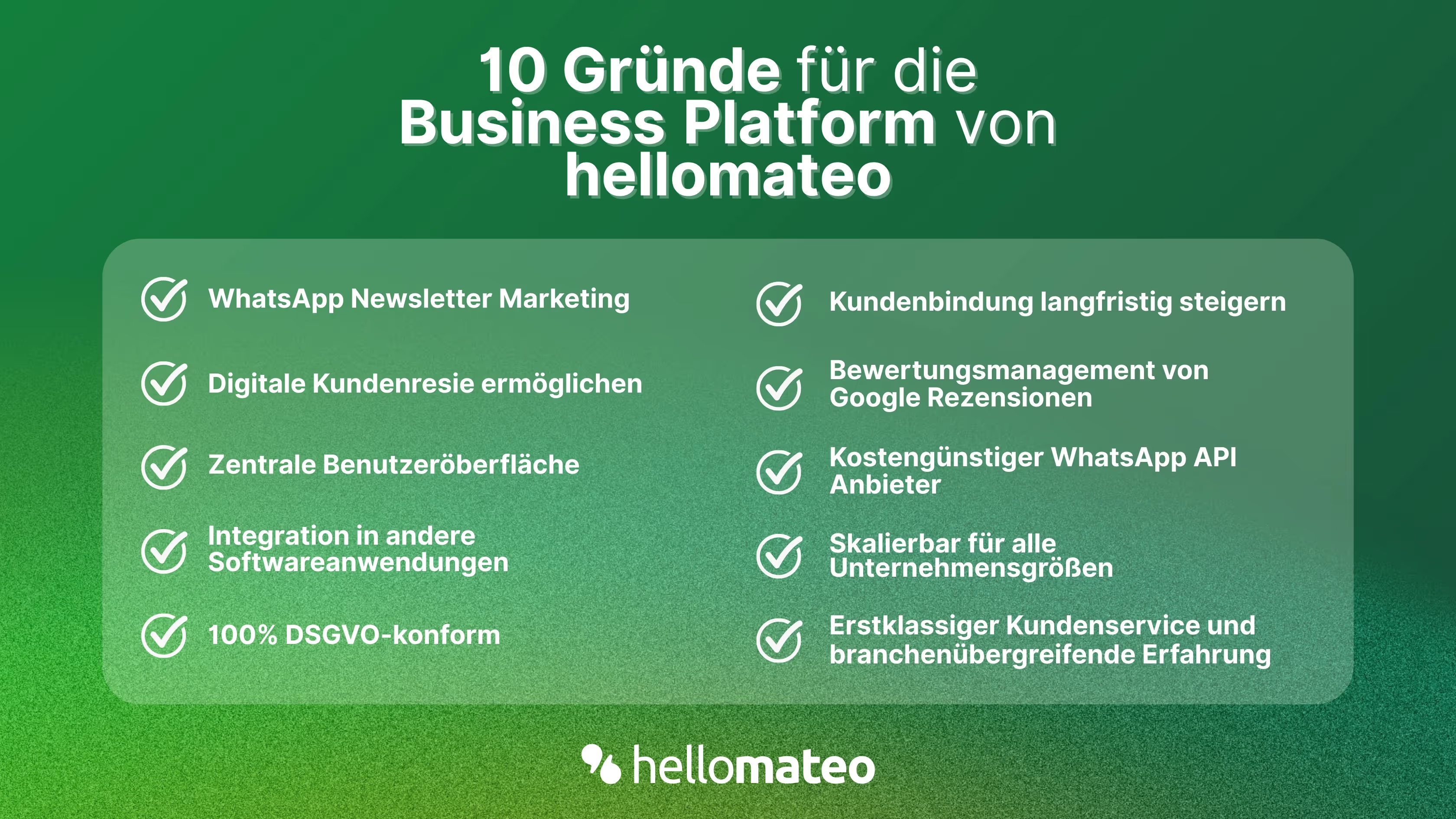
- Central user interface: hellomateo combines WhatsApp Business Platform, email, Instagram, SMS and Facebook Messenger in one central inbox. The intuitive user interface includes various tools for efficient customer communication and saves you valuable working time.
- integrations: With hellomateo, you can use WhatsApp in integrate over 6,000 software programs and fully automated Customer trips create with invitations, order confirmations, shipping information, invoices, and reminders.
- Newsletter marketing: Send GDPR-compliant Newsletter via WhatsApp or SMS and benefit from opening rates of over 95%.
- Assessment management: hellomateo can Automatically request online reviews from your customers, which boosts your Google ranking and trust in your company.
- Data protection: hellomateo meets all German and European Data protection requirements and offers end-to-end encryption for secure customer communication.
- scalability: Our software is suitable for Businesses of all sizes and can be extended indefinitely depending on the package.
- Diverse AI features: Our AI agent can automatically answer customer inquiries in chat, answer calls, help with the formulation of messages and much more.
Arrange a non-binding and free consultation and we'll show you how hellomateo covers your communication needs! Simply book an appointment here or write to us via our web widget.
About the author
Domenik Fox
CEO and Co-Founder
Domenik Fox is co-founder and CEO of hellomateo. He is responsible for Customer Success, Customer Engineering, Finance and Product. A particular focus of his work is on the continuous development of the product and the design of new features. In terms of content, he focuses primarily on automated and personalized customer communication, multichannel marketing and digital customer journeys. Together with Christian Strauch and Philipp Steinrötter, he is continuously developing hellomateo into a central platform for modern customer experience in SMEs.
More interesting articles
WhatsApp Business Data Processing Agreement— all information for companies
WhatsApp is an integral part of customer communication for many companies. High opening rates and quick responses make the channel attractive. But as soon as you use WhatsApp Business, you process personal data — and therefore there are clear GDPR requirements. In this article, you will find out what role the order processing contract plays and why it is indispensable for companies.

![Set up WhatsApp Business Auto Reply — Quick Guide [2025]](https://cdn.prod.website-files.com/68b19e5233a4641b9e2e4f95/692dd05228900f9fa9834bd4_whatsapp-automatische-antwort.avif)
Set up WhatsApp Business Auto Reply — Quick Guide [2025]
With automatic Reply messages Is there for them in the WhatsApp Business App provides a practical way to your customers in the digital chat channel automatically greet And in a flash one first reaction to show. Because day-to-day business is often stressful; you can't always respond personally to incoming messages and write back to the customer immediately.
But there are also many other reasons why it makes sense to use automatic reply messages when using the WhatsApp Business app. With this Quick guide Automatic answers are set up in a flash!

![Grüner Haken in WhatsApp – So bekommen Unternehmen die Verifizierung [Oktober 2025]](https://cdn.prod.website-files.com/68b19e5233a4641b9e2e4f95/692dcf56fb67605603b34297_gruener-haken.avif)
Grüner Haken in WhatsApp – So bekommen Unternehmen die Verifizierung [Oktober 2025]
WhatsApp hat eine neue Funktion eingeführt: Unternehmen können Ihr Konto verifizieren lassen und bei erfolgreicher Legitimation einen grünen Haken in dem WhatsApp Business Unternehmensprofil erhalten. Das sorgt für mehr Vertrauen bei Kaufinteressenten Ihres Unternehmens und steigert Ihre Umsätze! Zudem können Sie sich durch einen grünen Haken in WhatsApp Business von Ihren Wettbewerbern abheben. Doch wie funktioniert die Beantragung des beliebten Symbols? In diesem Beitrag zeigen wir es Ihnen!