What is the best way to respond to negative Google reviews?
13.02.2023
Arrange a non-binding consultation now
In a non-binding conversation, we'll show you how to use messenger communication in compliance with GDPR, automate processes and achieve measurably more revenue and efficiency with WhatsApp. Clear, practical and tailored to your company.

.avif)
Why even respond to (negative) reviews?
Of course, the question is why you should even bother responding to negative reviews. The background here is simple: With an answer, you give the customer review context and show potential new customers that you can be reached even if there is a problem or complaint. If you offer the dissatisfied customer help or a solution in the answer, this radiates competence and willingness to help new customers. In short: With your answer, you usually reduce the damage caused by a negative review.
What should you consider when writing an answer?
Of course, this damage minimization effect described above will only be achieved if your answer is well chosen. A researched or ill-considered answer usually leads in the opposite direction. But what exactly should you consider when writing a response to negative Google reviews? Read the essentials in the following five points:
1. Don't take it personally
Not you personally, but your company was rated by the customer. When writing a response to a negative Google review, you should definitely make sure that it doesn't look like you feel personally criticized. If a customer review references a specific employee, it also makes sense to keep them away from any response. This ensures that reference is made to the customer's problem objectively and neutrally.
2. Apologize
Even if you suspect at first glance that it wasn't you but the customer who actually did something wrong, you should apologize to them. It makes no sense to risk a dispute in Google review comments. The actual problem cannot be specifically defined in this way anyway. Even if it later turns out that the customer was actually in the wrong, the appearance was professional and solution-oriented.
3. Time counts
Studies have shown that the majority of people and customers who complain via social media channels expect a response within 1 hour of submitting their complaint. After receiving negative Google reviews, you should therefore pay particular attention to quickly defining the customer's problem and responding to it quickly.
4. Answer briefly first
Since the first response to a negative Google review in particular is publicly visible, you should keep it brief and not go into too much detail. Under no circumstances should you reveal customer or order data here. In order to actually solve the customer's problem, it is a good idea to contact them by phone or email. This means that the customer no longer has to write on Google with a faceless company, but has a personal contact person.
5. Be personal
When writing a response to a negative Google review, it's a good idea to be as personal as possible. Address the customer by name and actually write individual answers. A copy & paste complaint response will sooner or later be noticed by your customers and especially potential new customers and leave a very bad impression.
Reading tip: Tired of negative reviews? In further articles, we will explain how to make your Improve Google ranking easily Can and have further tips for Responding to negative reviews summarized.
It's easy to get better Google ratings with hellomateo
With hellomateo companies collect on average 2-3 times as many positive Google reviews one. How does that work? They send targeted review requests to satisfied customers via WhatsApp. In addition, the hellomateo solution enables you to communicate with customers via WhatsApp in accordance with GDPR, to process all message channels from a central inbox and to reactivate existing customers via a WhatsApp newsletter.
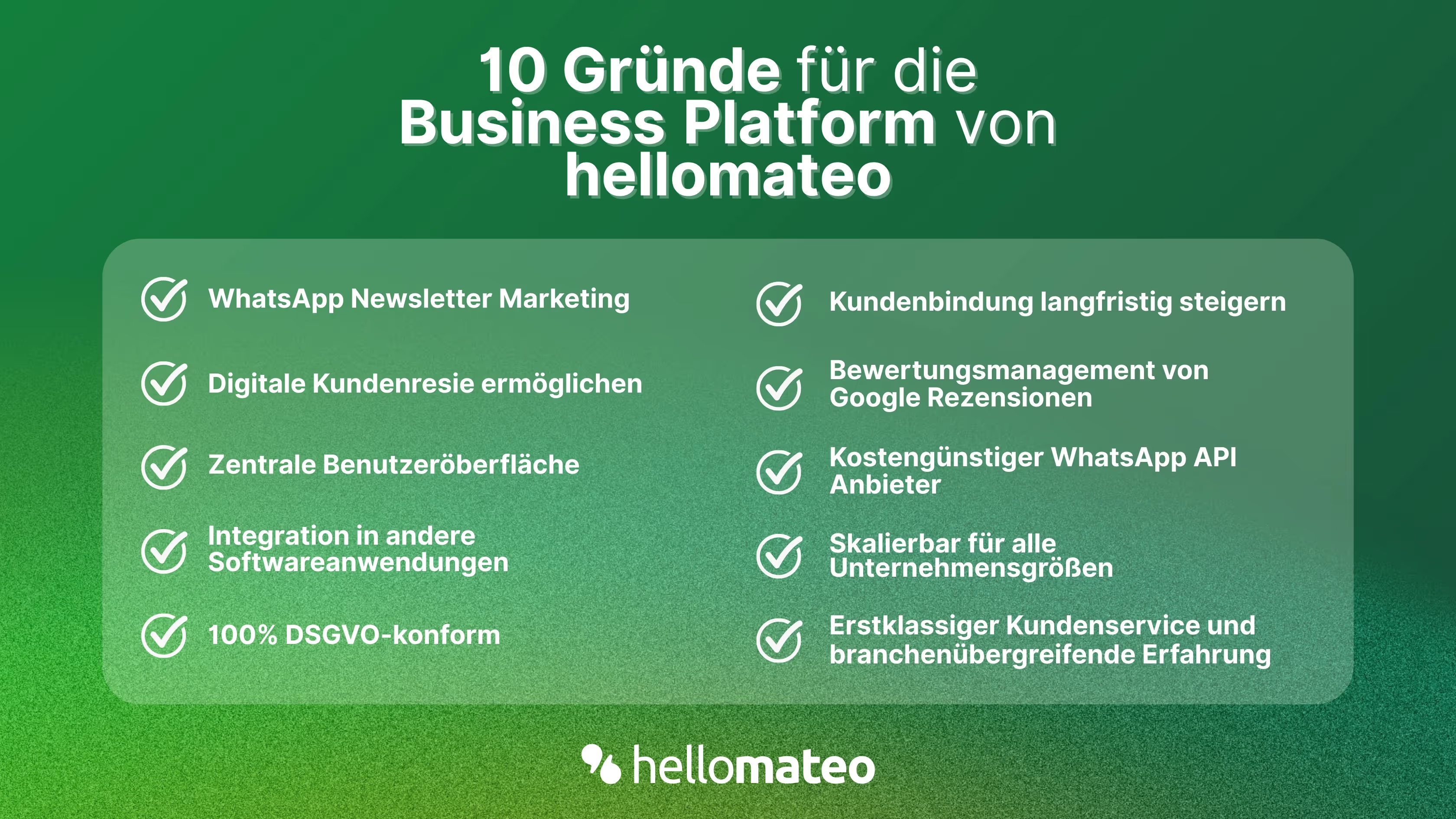
- Central user interface: hellomateo combines WhatsApp Business Platform, email, Instagram, SMS and Facebook Messenger in one central inbox. The intuitive user interface includes various tools for efficient customer communication and saves you valuable working time.
- integrations: With hellomateo, you can use WhatsApp in integrate over 6,000 software programs and fully automated Customer trips create with invitations, order confirmations, shipping information, invoices, and reminders.
- Newsletter marketing: Send GDPR-compliant Newsletter via WhatsApp or SMS and benefit from opening rates of over 95%.
- Assessment management: hellomateo can Automatically request online reviews from your customers, which boosts your Google ranking and trust in your company.
- Data protection: hellomateo meets all German and European Data protection requirements and offers end-to-end encryption for secure customer communication.
- scalability: Our software is suitable for Businesses of all sizes and can be extended indefinitely depending on the package.
- Diverse AI features: Our AI agent can automatically answer customer inquiries in chat, answer calls, help with the formulation of messages and much more.
Interested? Book a free, non-binding demo appointment and find out more about hellomateo. Book here.
About the author
Domenik Fox
CEO and Co-Founder
Domenik Fox is co-founder and CEO of hellomateo. He is responsible for Customer Success, Customer Engineering, Finance and Product. A particular focus of his work is on the continuous development of the product and the design of new features. In terms of content, he focuses primarily on automated and personalized customer communication, multichannel marketing and digital customer journeys. Together with Christian Strauch and Philipp Steinrötter, he is continuously developing hellomateo into a central platform for modern customer experience in SMEs.
More interesting articles
WhatsApp Business Data Processing Agreement— all information for companies
WhatsApp is an integral part of customer communication for many companies. High opening rates and quick responses make the channel attractive. But as soon as you use WhatsApp Business, you process personal data — and therefore there are clear GDPR requirements. In this article, you will find out what role the order processing contract plays and why it is indispensable for companies.

![Set up WhatsApp Business Auto Reply — Quick Guide [2025]](https://cdn.prod.website-files.com/68b19e5233a4641b9e2e4f95/692dd05228900f9fa9834bd4_whatsapp-automatische-antwort.avif)
Set up WhatsApp Business Auto Reply — Quick Guide [2025]
With automatic Reply messages Is there for them in the WhatsApp Business App provides a practical way to your customers in the digital chat channel automatically greet And in a flash one first reaction to show. Because day-to-day business is often stressful; you can't always respond personally to incoming messages and write back to the customer immediately.
But there are also many other reasons why it makes sense to use automatic reply messages when using the WhatsApp Business app. With this Quick guide Automatic answers are set up in a flash!

![Grüner Haken in WhatsApp – So bekommen Unternehmen die Verifizierung [Oktober 2025]](https://cdn.prod.website-files.com/68b19e5233a4641b9e2e4f95/692dcf56fb67605603b34297_gruener-haken.avif)
Grüner Haken in WhatsApp – So bekommen Unternehmen die Verifizierung [Oktober 2025]
WhatsApp hat eine neue Funktion eingeführt: Unternehmen können Ihr Konto verifizieren lassen und bei erfolgreicher Legitimation einen grünen Haken in dem WhatsApp Business Unternehmensprofil erhalten. Das sorgt für mehr Vertrauen bei Kaufinteressenten Ihres Unternehmens und steigert Ihre Umsätze! Zudem können Sie sich durch einen grünen Haken in WhatsApp Business von Ihren Wettbewerbern abheben. Doch wie funktioniert die Beantragung des beliebten Symbols? In diesem Beitrag zeigen wir es Ihnen!